21. The Assignment Builder and Grader (React)
The assignment builder and the grader are a single React single-page
application that instructors use to create assignments, choose or author
exercises, grade student work, and manage grades. It lives in
bases/rsptx/assignment_server_api/assignment_builder and is served by the
FastAPI assignment server (bases/rsptx/assignment_server_api). In a
running Runestone instance the app is reached at:
/assignment/instructor/builder– the assignment builder/assignment/instructor/grader– the grader
Both URLs load the same bundle; client-side routing selects the view. The
app replaces the old web2py instructor pages, and a couple of the very first
React screens it replaced are themselves still around as legacy routes
(/builderV2 and /graderOld) – see Two generations of code below.
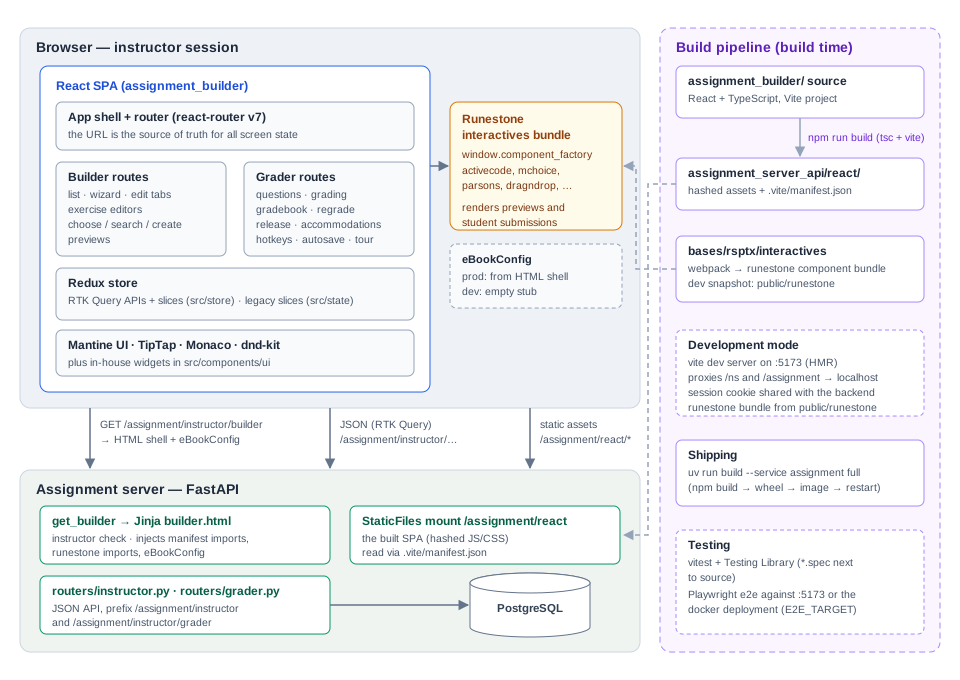
Overview of the assignment builder and grader. The left side is the runtime picture (browser above, assignment server below); the right column shows how the pieces are built, tested, and shipped.
21.1. Technology stack
React 18 with TypeScript (
strictmode; some older files are still plain.jsx).Vite for the dev server and production build.
Redux Toolkit for state, with RTK Query for all server communication.
react-router v7 with URL-driven state (the URL is the source of truth for which assignment, tab, wizard step, or student is showing).
Mantine as the UI component library (plus a small set of in-house components in
src/components/ui: DataGrid, TreeTable, EditableTable, notify, …).TipTap for rich-text question authoring, Monaco for code editing, dnd-kit for drag and drop, TanStack Table for grids, driver.js for the built-in feature tours.
vitest + Testing Library for unit tests, Playwright for end-to-end tests, eslint/prettier for style.
21.2. How the app is served
21.2.1. Development
In development the app runs on Vite’s dev server (port 5173).
vite.config.ts proxies API paths (/ns and /assignment) to
http://localhost, where the normal Docker composition (or dstart
servers) must be running. Authentication rides along on the Runestone
session cookie: log in as an instructor at http://localhost first, then
open http://localhost:5173 – the cookie is shared because both are on
localhost.
Two things that a served book page normally provides are stubbed in
development by index.html:
eBookConfigis created as an empty object. Anything that readswindow.eBookConfig(for example the course name in the navbar) sees defaults in dev mode.The Runestone interactives bundle (the webpack build of
bases/rsptx/interactives) is loaded dynamically by readingwebpack_static_imports.jsonfromVITE_LOAD_PREFIX(/runestonein dev, see.env.development). Vite serves that prefix from the checked-in snapshot inpublic/runestone. If you need newer component JavaScript in dev, rebuild the interactives and refresh that snapshot.
The interactives bundle is what lets the builder and grader render real
Runestone questions (previews, student answers): it registers
window.component_factory entries which the React code invokes through
src/componentFuncs.js.
21.2.2. Production
npm run build type-checks (tsc -p tsconfig.build.json) and then has
Vite emit the production bundle into the sibling directory
bases/rsptx/assignment_server_api/react together with a
.vite/manifest.json. The assignment server:
mounts that directory as static files at
/assignment/react(core.py),serves the page itself from the
get_builderendpoint inrouters/instructor.py. That endpoint verifies the user is an instructor for the course, then renders the Jinja templatecomponents/rsptx/templates/assignment/instructor/builder.html, whichinjects the hashed JS/CSS names read from the Vite manifest (
get_react_importsinrsptx.response_helpers),injects the per-course Runestone interactives imports (
get_webpack_static_imports),emits a real
eBookConfig(course, user,authorname, LaTeX preamble, …),provides the
<div id="root">mount point.
So in production the React app is a set of static assets plus a server-rendered shell page; there is no server-side React.
The build is wired into the normal service build:
projects/assignment_server/build.py runs npm install and
npm run build in assignment_builder (it requires the interactives to
have been built first), and uv run build --service assignment full
rebuilds wheel, image, and container. The wheel deliberately excludes
react/runestone, public/runestone, node_modules and other heavy
frontend artifacts (see projects/assignment_server/pyproject.toml).
21.3. Application architecture
21.3.1. Entry point and shell
src/index.tsx creates the Redux store provider and the Mantine
providers (theme, modals, notifications) and renders App.
src/App.tsx builds the router. Every route renders inside
AppContent, which provides the application shell: the top navigation
bar (src/components/shell/AppNavBar, fed by navUtils.ts and
eBookConfig) and the scrollable content region. Routes matching
/builder or /grader render “full bleed”; everything else is wrapped
in a centered container.
21.3.2. Routing: the URL is the state
The route table in App.tsx is the map of the application:
/                                    -> AssignmentBuilder (lazy)
/builder                             -> AssignmentBuilder (lazy)
/builder/create[/:step]              -> creation wizard
/builder/:assignmentId[/:tab]        -> edit an assignment (basic|readings|exercises)
/builder/:id/exercises/:viewMode/... -> exercise list / browse / search / create / edit
/grader                              -> Grader (lazy), assignment list
/grader/gradebook                    -> gradebook
/grader/:assignmentId                -> question list for an assignment
/grader/:assignmentId/questions/:questionId[/students/:sid]
                                     -> grade one question / one student
/builderV2, /graderOld               -> legacy first-generation screens
/except                              -> deadline-exception scheduler
The two big route components are loaded lazily so the builder does not pay
for the grader’s code and vice versa. Inside the builder, the hook
useAssignmentRouting parses the URL into a typed route state (mode,
wizard step, active tab, exercise view mode, exercise type/step, …) and
provides navigation helpers; components never keep “which screen am I on”
in local state. Deep links and browser back/forward therefore just work,
and the e2e tests rely on that.
21.3.3. State management
All server communication goes through RTK Query APIs, one per feature
folder in src/store:
src/store/
  assignment/           assignment CRUD        (assignment.logic.api.ts + assignment.logic.ts)
  assignmentExercise/   exercises attached to an assignment
  readings/             readings attached to an assignment
  exercises/            question CRUD / search
  chooseExercises/      the book-tree exercise chooser (slice only)
  searchExercises/      smart search state (slice only)
  dataset/, datafile/   supporting data
  grader/               everything the grader needs
  user/                 current user info
The convention within a feature folder is <feature>.logic.api.ts for the
RTK Query API (endpoints, cache tags) and <feature>.logic.ts for a
companion slice holding client-side state. All endpoints hit the FastAPI
assignment server under /assignment/instructor/...; the grader API uses
/assignment/instructor/grader/.... src/store/baseQuery.ts supplies
the shared fetchBaseQuery plus an error-handling wrapper that pops a
Mantine notification on failures (with a specific message for expired
sessions).
21.3.4. Two generations of code
There are two state trees and two component styles in the repository, and it is important to know which is which:
src/store+src/components/routes– the current generation: TypeScript, RTK Query, Mantine. This is where new work goes.src/state+src/renderers– the first generation: plain.jsxrenderers and hand-written slices (acSlice,assignSlice,ePickerSlice, …). These power the legacy/builderV2and/graderOldroutes and a few shared selectors (for exampleselectIsAuthorized, which gates the whole app).
The store that actually runs is src/state/store.ts; it combines both
generations’ reducers. Watch out for one naming trap: the key
assignment in the live store belongs to the legacy assignSlice,
while the new assignmentSlice is registered as assignmentTemp.
(src/store/store.ts builds a store from only the new reducers and is
used by tests.) When the legacy routes die, the intent is for
src/store/rootReducer.ts to become the real root.
21.3.5. The assignment builder
src/components/routes/AssignmentBuilder contains:
components/list– the assignment list (entry screen).components/wizard– the three-step creation wizard (basic info, assignment type, visibility).components/edit– the edit view with itsbasic/readings/exercisestabs.components/reading– picking book sections to read.components/exercises– the largest subsystem. The exercises tab can list what is assigned (AssignmentExercisesList), browse the book tree (ChooseExercises), search the question bank (SearchExercises), or author a brand new question (CreateExercise).hooks–useAssignmentRouting(above),useAssignmentForm,useAssignmentState, name validation.
CreateExercise is a small framework of its own. ExerciseFactory.tsx
switches on the question type and renders one editor component per type
(MultiChoiceExercise, ActiveCodeExercise, ParsonsExercise,
FillInTheBlankExercise, DragAndDropExercise, ClickableAreaExercise,
PollExercise, ShortAnswerExercise, MatchingExercise,
SelectQuestionExercise, IframeExercise). Each editor is a stepped
form built on BaseExerciseForm and shared TipTap-based inputs; shared
step/validation plumbing lives in CreateExercise/shared and
CreateExercise/hooks. Display metadata for the type chooser (family,
label, tag, icon, color) comes from src/config/exerciseTypes.ts.
Question JSON import (see Question JSON Schema) is handled by
ImportQuestionJsonModal with helpers in src/utils/importQuestionJson.ts.
Previews render the actual Runestone component: helpers in
src/utils/preview generate the component HTML for each question type
and renderRunestoneComponent in src/componentFuncs.js asks the
globally loaded interactives bundle (window.component_factory) to bring
it to life inside a ref’d div.
21.3.6. The grader
src/components/routes/Grader is organized as pages plus supporting
components and hooks:
pages/GraderAssignmentsPage– pick an assignment.pages/GraderQuestionsPage– per-question stats for the assignment.pages/GraderQuestionPage– the working view: a student list sidebar, the student’s submission rendered as a live Runestone component (SubmissionPane), and the grading panel (GradePanel).pages/GraderGradebookPage– the gradebook grid.
Notable behaviors, each with its own hook or component: grade autosave
(useAutoSaveGrade + SaveStatusPill), keyboard-driven grading
(useGraderHotkeys, ShortcutsHelpDialog), multi-student grading
(MultiGradeDialog, StudentMultiSelect), regrading with a preview
step (RegradeWizard), releasing grades and pass thresholds
(ReleaseGradesControl, ThresholdControl), manual totals, deadline
accommodations (DeadlineExceptionDialog), and a driver.js onboarding
tour (useGraderTour, tour/). The server side for all of this is
routers/grader.py (endpoints for answers, history, grades, regrade
preview/apply, release, thresholds, gradebook data, rosters,
accommodations).
21.4. Getting started for programmers
21.4.1. Prerequisites
Node 18+ and npm 8+ (enforced in package.json), plus a working local
Runestone (see Docker and Environment Setup). All commands below run from
bases/rsptx/assignment_server_api/assignment_builder.
21.4.2. The edit/run loop
Start the backend:
docker compose --profile basic upfrom the repo root (or thedstartdevelopment servers – then adjust the proxy ports invite.config.ts).Log in at
http://localhostas an instructor (testuser1in the standard dev database).npm install(first time), thennpm start.Open
http://localhost:5173for the builder,http://localhost:5173/graderfor the grader. Vite hot-reloads your edits; API calls are proxied to the backend from step 1.
21.4.3. Where things go
Path |
What lives there |
|---|---|
|
route table |
|
builder screens, wizard, exercise editors |
|
grader pages, grading widgets, hotkeys, tour |
|
navbar and app shell |
|
reusable widgets (DataGrid, TreeTable, notify, …) |
|
RTK Query API + slice for one feature |
|
cross-feature hooks |
|
exercise-type metadata (labels, families, icons) |
|
pure helpers; per-type preview HTML generators |
|
shared TypeScript types |
|
legacy generation – avoid for new work |
|
Playwright suites |
Path aliases @/*, @store/* and @components/* are configured in
both tsconfig.json and vite.config.ts.
21.4.4. Conventions
New code is TypeScript with
stricton; prefer function components and hooks.Tests are colocated:
Foo.tsxhasFoo.spec.tsxnext to it.Lint must be clean – CI style is
npm run test:eslint(--max-warnings=0). Prettier settings are in.prettierrc.Server data belongs in an RTK Query endpoint, not in a hand-rolled
fetch; client-only state belongs in the feature’s slice; screen identity belongs in the URL.
21.4.5. Testing
npm test– vitest in watch mode with coverage (jsdom, Testing Library; global setup invitest.setup.ts).npm run test:e2e– Playwright against the Vite dev server (it logs in via the backend, so steps 1-2 of the edit/run loop must be running).npm run test:e2e:smokeruns the@p0subset;test:e2e:dockertargets the app as served by Docker/nginx instead of Vite (E2E_TARGET=docker).One-off suites live under
e2e/<area>(assignments, exercises, grader, wizard, tiptap, …) with fixtures ine2e/fixtures.
21.4.6. Common tasks
Adding a server-backed feature. Add the endpoint to the FastAPI side
(routers/instructor.py or routers/grader.py), then add an endpoint
to the feature’s *.logic.api.ts with appropriate cache tags so lists
refetch when mutations invalidate them. Components consume the generated
hooks (useGetXQuery, useUpdateXMutation).
Adding a screen or sub-view. Add the path to the route table in
App.tsx; for builder sub-views also extend useAssignmentRouting so
the new URL shape round-trips to route state. Keep the component lazy if
it is heavy.
Adding a new exercise type editor. The checklist:
Register the type in
src/config/exerciseTypes.ts(family, label, tag, description, icon).Create
CreateExercise/components/<YourType>Exercisefollowing an existing editor (start from a simple one likePollExercise); build the steps onBaseExerciseFormand the shared inputs.Add the case to
ExerciseFactory.tsxand the export to the folder’sindex.ts.Add a preview generator in
src/utils/previewthat emits the component’s HTML soExercisePreviewcan render it (the interactives bundle must know the type – see Developing the Javascript for Runestone Components).If the type supports question-JSON authoring, extend
src/utils/importQuestionJson.tsand see Question JSON Schema.Server side: make sure
new_question/update_questioninrouters/instructor.pyaccept the type and that htmlsrc generation is correct.
Shipping. npm run build writes the production bundle to
../react; build and restart the service with
uv run build --service assignment full (or run
projects/assignment_server/build.py, which performs the npm build for
you). Remember the interactives must be built first if their dist is
missing.
21.4.7. Gotchas
Two store generations. The running store is
src/state/store.ts; theassignmentkey is the legacy slice, the new one isassignmentTemp. Put new state insrc/store.eBookConfig is empty in dev. Production pages inject a real one via the
builder.htmltemplate; guard reads accordingly.The interactives bundle is global. Question previews and submission rendering depend on
window.component_factoryfrom the separately builtbases/rsptx/interactiveswebpack bundle (snapshot inpublic/runestonefor dev).public/jQuery.jsis still loaded for the remaining jQuery-dependent interactive (codelens/pytutor).URL first. Resist adding “current screen” component state; extend the routing instead, or deep links and the e2e suites will break.
Instructor-only.
get_builderredirects non-instructors, and the app renders a sign-in message when the first assignment fetch is unauthorized (selectIsAuthorized).
See also README.md and DEV_NOTES.rst in the assignment_builder
directory for historical notes.